What Your Appraisal Software Is (and Isn't) Ready For with UAD 3.6
One of the first questions I get from appraisers about UAD 3.6 has nothing to do with the new data fields or the reporting changes. It's simpler than that.
"Is my software ready?"
It's the right question. If your report software can't produce a compliant UAD 3.6 report, nothing else matters. You can take every training course available and it won't help you if TOTAL, ACI, or whatever you're using hasn't shipped the update yet.
So here's where the major vendors stand as of March 2026 - what's ready, what's rolling out, and what's still unclear. I'll also cover something most appraisers aren't thinking about: the gap between what your report software does and what the rest of your practice needs.
TOTAL by a la mode
TOTAL is the most widely used report software in the industry, so this is where most appraisers are focused.
a la mode released their UAD 3.6 "Launch Editions" in late January 2026. But "released" comes with an asterisk - they're rolling out features in phases that extend through September 2026. That means the version you have today may not have every UAD 3.6 capability yet. More features are coming in subsequent updates. (a la mode UAD 3.6 timeline)
What's working: the core UAD 3.6 report structure is available. You can create and submit UAD 3.6 reports. TOTAL for Mobile has been enhanced with conditional logic that guides you through the new field data collection requirements - which should help with capturing room-level detail during inspections. Offline capability is preserved, which matters for rural appraisers or anyone inspecting properties with spotty cell service.
What's still rolling out: some features are being added in phases through September. Check a la mode's timeline page regularly for specifics on what's available in the current version versus what's coming.
If you're a TOTAL user, the move right now is to update to the latest version and start experimenting with a mock UAD 3.6 report. Don't wait for the "complete" version - the core functionality is there, and the learning curve starts when you start clicking, not when every feature is shipped.
The TOTAL UAD 3.6 User's Guide is the best starting point. And the live demo video is worth 30 minutes of your time.
One appraiser on Reddit shared their first experience with UAD 3.6 in TOTAL and the thread quickly became a mix of "this isn't as bad as I expected" and "where did they move the GLA field?" That's the normal reaction. The interface is different enough to be disorienting on day one, but familiar enough that it clicks within a few sessions. (Reddit: UAD 3.6 in TOTAL)
ACI Sky Workbench
ACI took a different approach than a la mode. Rather than retrofitting their legacy desktop software, they built ACI Sky Workbench as a new cloud-based platform purpose-built for UAD 3.6. (ACI UAD page)
The cloud-based approach has advantages: it integrates with MLS and public records data directly, includes automated compliance checks, and offers real-time validation through ACI Sky Delivery. Because it's browser-based, updates happen automatically without you downloading and installing anything.
The trade-off: if you've been using ACI's desktop software for years, the transition to Sky Workbench is essentially a platform migration on top of the UAD 3.6 changes. That's two learning curves at once. And one concern appraisers have raised is whether their historical comp data - potentially 20 years' worth - will migrate to the new platform.
If you're an ACI user, start exploring Sky Workbench now. The sooner you get familiar with the new interface, the less you'll be juggling in November.
SFREP Appraise-It Pro
SFREP has the distinction of being first. The first UAD 3.6 appraisal report ever submitted through UCDP was completed using SFREP's Appraise-It Pro on November 14, 2025, by appraiser Adam Winstead. He described the process as "far easier than anticipated." (SFREP announcement)
SFREP's approach emphasizes mobile data collection with structured checkboxes and pull-downs designed around the UAD 3.6 field requirements. They've also published printable field data collection checklists that are genuinely useful even if you don't use SFREP - they give you a physical checklist of what data to capture during inspections under the new requirements.
SFREP's UAD 3.6 implementation uses a direct field editing approach rather than a wizard-style workflow, which some appraisers prefer for speed.
ClickFORMS
ClickFORMS has less publicly available information about their UAD 3.6 timeline compared to the other vendors. Bradford Technologies (ClickFORMS' parent company) is building a new product called NightHawk alongside maintaining ClickFORMS for UAD 2.6 work. They were surveying users as recently as March 2026 about the NightHawk transition.
If you use ClickFORMS, contact Bradford directly for their current UAD 3.6 status and timeline. Don't assume it's ready without confirming.
The Question Nobody's Asking
Here's where I want to zoom out from the software vendor comparison.
Every conversation about UAD 3.6 software readiness focuses on the same thing: can my report software produce the new form? That's important. But it's only half the picture.
Report software handles the report. It doesn't handle your orders. It doesn't track your clients. It doesn't plan your routes or log your mileage. It doesn't send your invoices, chase your payments, track what you owe contractors, or help you find private clients.
For all of that, most appraisers are using the same duct tape stack they've been using for years: spreadsheets for order tracking, Google Calendar for scheduling, QuickBooks for invoicing, paper or nothing for mileage, and their memory for client information. (I wrote more about why that setup is costing you time and money in The "Duct Tape Stack": Why Most Appraisers Use 5+ Tools to Do One Job.)
The UAD 3.6 transition is about to make the operations side of your practice harder, not easier. More data to collect. More time per report. More complexity in the workflow. Adding that increased workload on top of a disorganized operational foundation is the recipe for dropped orders, missed deadlines, and burned-out appraisers.
Report Software vs. Practice Management: They're Different Things
This distinction matters more than most appraisers realize.
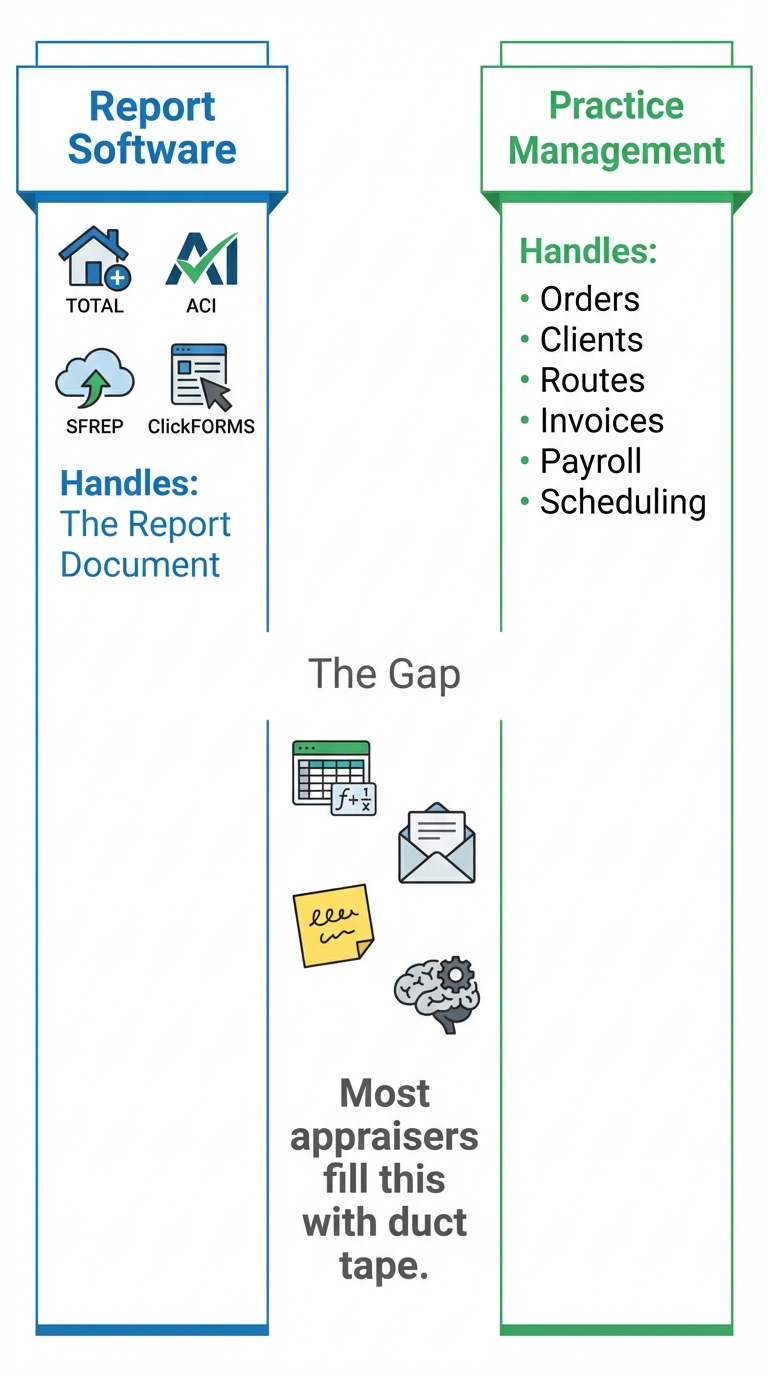
Report software (TOTAL, ACI, SFREP, ClickFORMS) handles one thing: producing the appraisal report document. That's its job and it does it well.
Practice management handles everything else: orders, clients, scheduling, routes, invoicing, payments, contractor tracking, and - increasingly - AI-assisted report preparation and UAD 3.6 data organization.
Most appraisers use report software for the report and a patchwork of other tools for the rest. The problem is that those tools don't talk to each other, they require re-entering data in multiple places, and none of them were built for how appraisers actually work.
This is the gap Appraiser Machine was built to fill. It sits alongside your report software - handling orders, clients, routes, invoicing, payroll, and AI report prep while TOTAL, ACI, or SFREP produces the final document. Native .tdcx export for TOTAL users, MISMO XML for ACI and ClickFORMS, Smart Copy for SFREP. Those exports cover today's UAD 2.6 forms. You start UAD 3.6 reports in your report software, and Appraiser Machine handles the UAD 3.6 order intake and tracking. The report software does what it does best. Everything else runs through one system.
What to Do This Week
1. Confirm your report software version. Check that you have the UAD 3.6 compatible update installed. If not, update now.
2. Open a blank UAD 3.6 report. Spend 30 minutes clicking through the interface. Find where key fields live. The layout is different from what you know.
3. Complete one mock report. Pick a property you've already appraised. Work through the whole thing. You'll discover your personal data gaps. (Full preparation steps in the UAD 3.6 Checklist.)
4. Think about the other half. Your report software handles the report. What handles the rest? If the answer is "spreadsheets and memory," the UAD 3.6 transition is a good time to fix that.
Related Articles:

Jon Barrett
Jon Barrett is the founder of Appraiser Machine and has spent over a decade working with independent appraisers. He's built 300+ appraiser websites, co-led a national appraiser mastermind group, and talked with hundreds of appraisers about what's actually working in their practices. He built Appraiser Machine because the operations side of running an appraisal practice was still stuck in spreadsheets and duct tape - and appraisers deserved better.