
Appraiser Machine Logo

Everything You Need to Run Your Practice

No complicated setup. No learning curve. Just simple tools that work - designed exclusively for real estate appraisers.

Authoritative Data · Not AI

Public record verified — every order, automatically

The moment you open an order, the property card already shows owner, APN, legal description, year built, GLA, lot size, tax year, annual taxes, assessed value, and prior sales — sourced from a national public-records dataset and surfaced with the parcel boundary outlined on the map. No manual lookups. No data entry. No AVM guesswork.

Loaded on every new order

Type an address into the intake form. Within two seconds, 12+ verified fields populate alongside the green “Public record” badge. Property type auto-selects when the record is unambiguous. Submit the order and it’s already done.

Cross-validates your report

Pre-Submit QC compares your reported APN, year built, GLA, lot size, and owner of record against the public record. Flags any disagreement before the AMC sees it — the most common revision-request trigger, eliminated.

Flows into your exports

MISMO XML and the workfile bundle both pull verified fields when your typed columns are blank. Defensible provenance: every exported field is traced back to its public-record source with a refresh date.

Why “public record verified” matters more than “AI extracted”

No AI inference. Pulled directly from public county records.
Workfile-defensible. Cite the public-record source with refresh date.
No AVM exposed. You’re the valuation. We never auto-surface AVMs.
90-day refresh. Records stay current; cache stays free.
Industry First

Built-In AI Report Prep for UAD 3.6

Your current software manages orders. Ours helps you complete them. Built-in AI that understands UAD 3.6, USPAP, and how appraisers actually work.

UAD 3.6 mandatory in 158 days, 1 hours

AI Narrative Generator

Dictate or type rough field notes. Select your UAD 3.6 section. Get polished, compliant narrative text in seconds — formatted for your report software or plain text. Voice dictation works from your truck.

Saves 2-3 hours per report

AI Photo Analyzer

Upload your inspection photos. AI classifies every room, detects materials like countertops and flooring, and suggests UAD condition (C1-C6) and quality (Q1-Q6) ratings. Review, confirm, and move on.

20 photos analyzed in under 2 minutes

AI Condition & Quality Estimates

After the public-record fields are loaded, layer Gemini-extracted estimates on top: C1-C6 condition rating, Q1-Q6 quality rating, construction materials, and short narrative descriptions. Always verify against your inspection notes.

Adds the judgment layer public records can't carry

AI reads engagement letters and extracts every requirement — never miss scope-of-work details buried on page 37
Paste an MLS listing or link — AI extracts address, sale price, beds, baths, GLA, and property details instantly
Comparable sales grid — enter up to 6 comps with C/Q ratings and adjustment presets, or paste MLS data to auto-fill
Drag-and-drop AMC order PDFs to auto-fill new orders — saves 10-15 minutes of data entry
Voice dictation from your phone or truck — no keyboard required
Smart Copy knows your software — one click formats output for your report software or plain text
Every AI suggestion is reviewable — you’re always in control, AI just does the grunt work
Built-In AI Assistant

Ask Your Business a Question. Get a Real Answer.

No more digging through reports. Type or speak your question and get an answer pulled from your actual business data - orders, clients, invoices, revenue, and more.

Ask Anything About Your Business

Type a question like "How much did I bill last month?" or "Which clients owe me money?" and get a real answer from your actual data. No reports to build.

Answers in seconds

Voice Input - Talk From Your Truck

Tap the microphone and dictate from anywhere — your truck, the field, or between inspections. Professional-grade transcription actually understands appraisal terms. Add notes to your workfile, ask AI questions, or dictate comp reasoning — all hands-free.

Hands-free operation

Voice Output - It Reads the Answer

Hit the speaker icon and the AI reads its answer aloud in a natural voice. Perfect for driving. Choose male or female voice in your preferences.

Eyes on the road

Knows your orders, clients, invoices, quotes, and schedule
Admins see the full picture - appraisers see only their own work
Remembers what you asked earlier in the conversation
Available on desktop and mobile - same assistant everywhere

Core Operations

The Foundation of Your Practice

Today Page — Your Action-First Home

Land on Your Priorities, Not Your Dashboard

Every time an appraiser or team member logs in, they start on Today — one page showing exactly what needs their attention right now, with one-click Call, Email, and SMS on every row. Account Admins keep Dashboard as their analytics home. Different page for different jobs.
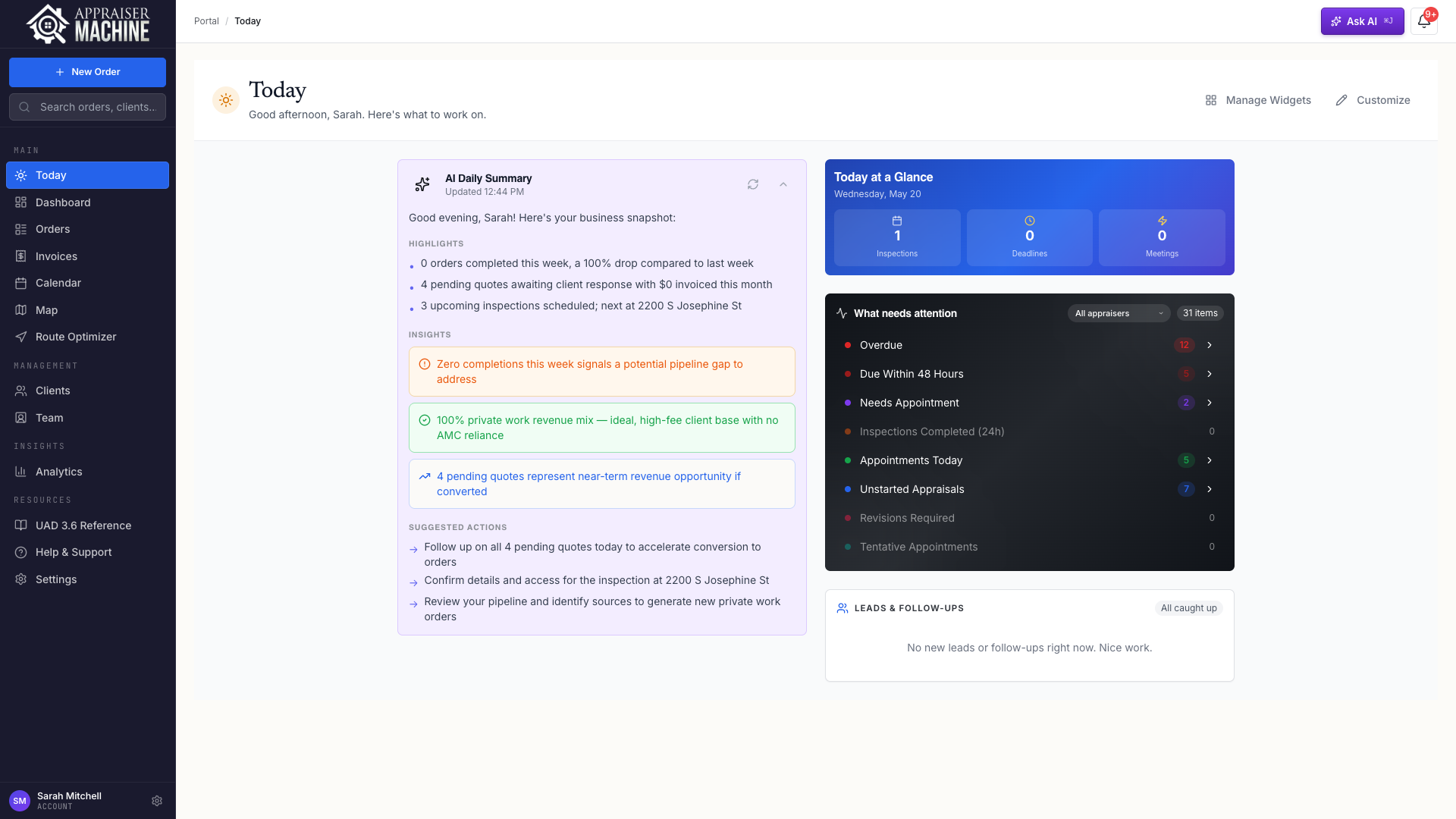
Appraiser Machine Today page showing AI Daily Summary, Today at a Glance, What Needs Attention, and Leads & Follow-ups widgets
  • What Needs Attention — orders grouped by urgency (Overdue, Due 48h, Revisions, Appointments Today) with inline Call + Email on every row
  • Leads & Follow-ups — quote-side companion with New Leads, Follow-ups Due, and Check-ins; inline SMS when NLP is connected
  • "N from ads this week" pill — see ad-sourced leads at a glance without opening analytics
  • Admin appraiser picker — Mine / All appraisers / drill into a specific teammate's view
  • Mark-as-contacted in one click — lead moves from New Leads to Follow-ups automatically
  • Today at a Glance — three clickable tiles (Inspections / Deadlines / Meetings)
  • Fully customizable — drag-drop widgets, hide what you don't use, saves per-device
  • Role-based default landing — appraisers/users → Today, admins → Dashboard (both reachable either way from the sidebar)

Solo Appraisers

Open your phone, see what matters, make the calls. No scrolling through an order list trying to remember who you owed a follow-up.

Teams

Your VA works the Today page top-to-bottom. New lead comes in → she sees it, clicks Call. Order goes overdue → she sees it. No dropped balls.

Leads & Follow-ups Panel

Every Quote in One Scan

The quote-side action panel on Today. Three buckets: new leads waiting for outreach, follow-ups going stale, and check-ins you explicitly set. Every row has Call, Email, and (with NLP) SMS inline — no copy-pasting phone numbers, no switching tabs.
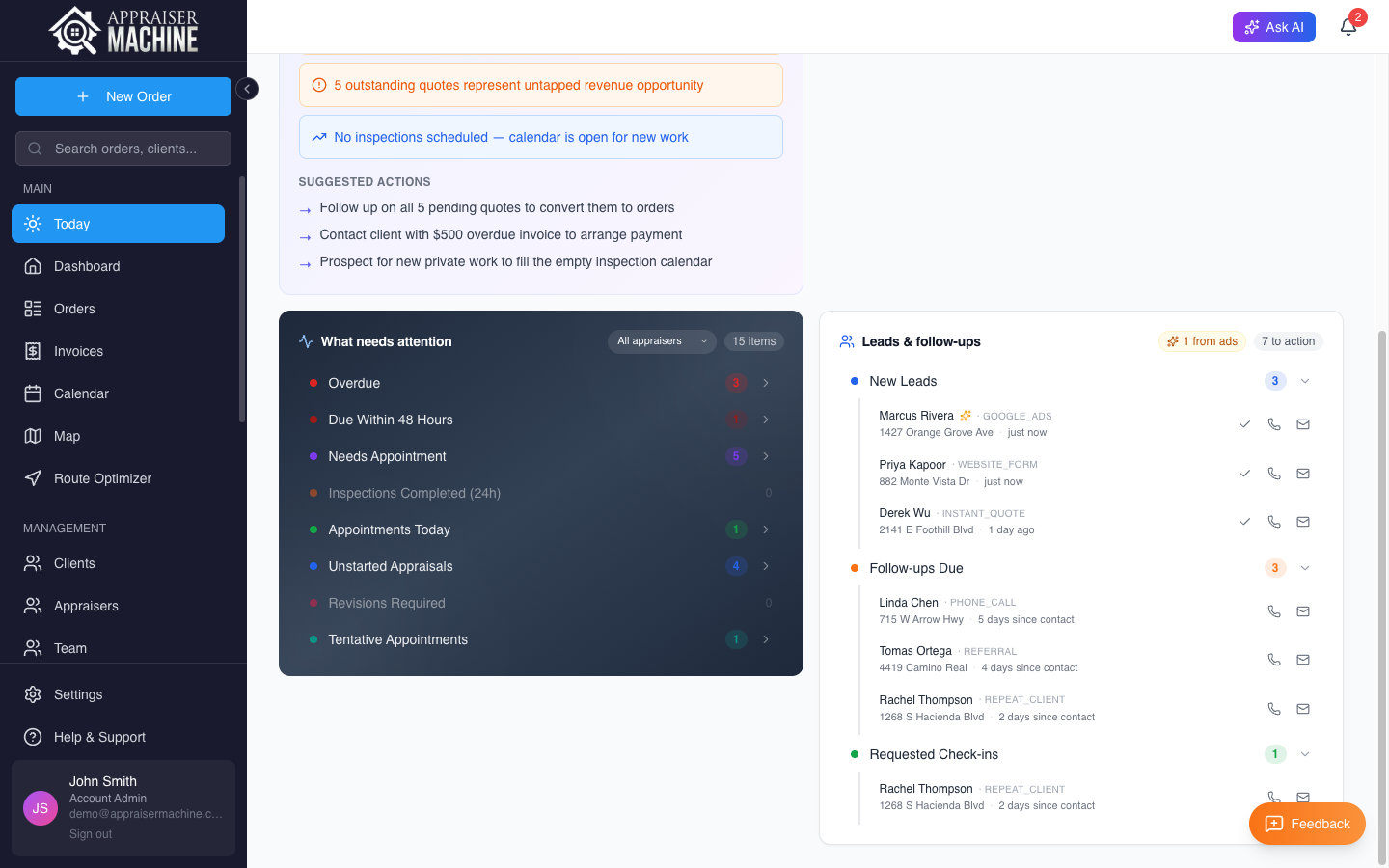
Leads & follow-ups panel showing New Leads (Marcus, Priya, Derek with Google Ads attribution), Follow-ups Due, and Requested Check-ins buckets with inline Call, Email, and SMS action icons on every row
  • New Leads bucket — quotes ≤72h old that haven't been contacted yet
  • Follow-ups Due — contacted quotes that have gone stale (3+ days silent) or are past their explicit follow-up date
  • Requested Check-ins — reminders you set yourself, surfaced when due today or past
  • Inline Call / Email always visible when the contact has those fields on file
  • Inline SMS via NLP — composer modal with segment counter; sends through your NLP number, logs to activity thread and NLP conversation simultaneously
  • Mark-as-contacted Check icon — one click stamps the timestamp and moves the lead to Follow-ups
  • Ad-sourced detection — sparkle icon + "N from ads this week" header pill so you can see ad ROI at a glance
  • Source tags visible — Google, Site Form, Thumbtack, Webhook, etc.

Solo Appraisers

The fastest path from 'a lead came in' to 'they're on the phone with you.' Three buckets, action buttons, done.

Teams

SMS flow goes through NLP so everything logs automatically on both sides. Your VA works the panel; the activity trail is complete without her copying anything into the CRM.

Complete Order Management

Never Lose Track of an Order Again

Track every order from quote request through final payment. Visual pipeline shows exactly where every order stands at a glance.

  • Visual pipeline organized by status (Pending, Assigned, In Progress, Completed)
  • Smart filtering by client, address, status, or appraiser
  • Automatic change tracking and audit logging
  • Quote-to-order conversion in one click
  • Rush order flagging for urgent work
  • Bid tracking with accept, decline, counter — convert wins to orders
  • Kanban board view — drag-and-drop visual pipeline management
  • Pipeline value tracking — total dollar amount of in-progress work
  • Multi-type support: Lender, Private, and Commercial tracking
  • Multiple report types per order (e.g., 1004, 1073, 1025, 1007, GPAR, and more)
  • Lead source tracking — 12 sources with analytics dashboard
  • Auto-assign appraiser by coverage area, distance, and workload
  • Revision tracking with round counter and full history
  • Unscheduled order alerts flag missing inspection dates
  • Email import — forward order emails, AI creates orders automatically
  • Custom fields — track case numbers, attorney names, hearing dates, or anything your practice needs
  • Client portal — magic-link access so clients check status without calling you
  • Customizable dashboard — drag-and-drop widgets

Solo Appraisers

Like having a virtual assistant who never forgets anything and keeps you organized without any effort.

Teams

Assign orders to different appraisers, see who is working on what, and make sure nothing falls through the cracks.

Client Database

All Your Client Info, Right When You Need It

One central database for all your clients - lenders, AMCs, attorneys, private clients, everyone. With full contact information, order history, and payment terms.

  • Complete contact records with payment terms
  • Client types: Lender, AMC, Individual, Law Firm, etc.
  • Full order history per client
  • Revenue tracking by client
  • Accounts receivable aging (current, 30, 60, 90+ days)
  • Billed, paid, and outstanding tracking per client
  • Quick order creation in 30 seconds for existing clients
  • Payment terms tracking (Net 30, Net 60, etc.)

Solo Appraisers

No more hunting through old emails or trying to remember if you worked with this attorney before.

Teams

Your whole team can see client information, notes, and history. New team members get up to speed instantly.

Invoicing & Payments

Get Paid in Days, Not Weeks

Create professional invoices in seconds, email them to clients, and let them pay you instantly with a credit card. Everything tracked automatically.

  • Professional branded PDF invoices with your logo
  • Multi-order invoicing — batch select orders, create one invoice
  • Split-client invoicing — combine orders from different clients
  • One-click online payment links via Stripe
  • Stripe refunds — issue full or partial refunds from the invoice page
  • Automatic status tracking: Draft, Sent, Viewed, Paid, Overdue
  • Payment terms: Net 15, 30, 45, 60, or custom
  • Smart escalating invoice reminders - stop chasing payments
  • Bulk collection reminders — send overdue notices to multiple clients at once
  • Auto-delivery emails — mark a report delivered, client gets a branded email with a pay-now link
  • Complete payment history and audit trail

Solo Appraisers

Get paid in days instead of weeks. No more awkward follow-up calls.

Teams

See who is collecting payments, track cash flow, and manage contractor payouts with the built-in payroll system.

Calendar & Scheduling

Never Miss a Deadline

Centralized calendar that syncs with Google Calendar and Outlook, and connects to your orders. See everything in one place.

  • Month, week, and day views
  • Color-coded event types: Inspections, Deadlines, Meetings
  • Events linked to specific orders
  • Google Calendar + Outlook two-way sync
  • Upcoming events sidebar for quick reference
  • Mobile access from the field

Solo Appraisers

One calendar with everything. No more double-booking.

Teams

See the whole team's schedule, identify conflicts, balance workload.

Route Optimizer & Mileage Tracker

Plan Your Day. Optimize the Route. Log Every Mile.

Pull in today's inspections, speak or type your stops in plain English, and get a traffic-aware optimized route in seconds. Every mile logs automatically - tied to the order it belongs to, no end-of-year logbook reconstruction.

  • One-click daily import pulls orders + calendar events automatically
  • AI-powered input - type or speak your stops in plain English
  • Google's predictive traffic model, not just straight-line distance
  • Time window conflict detection with red warnings
  • Interactive map with color-coded markers and detailed ETAs
  • Automatic mileage logging at current IRS rate ($0.725/mile) - every trip tied to an order
  • "Text My Route" - every stop texted to your phone with one-tap navigation
  • QR code or direct link to open full route in Google Maps
  • Drag-and-drop reordering after optimization
  • Export to PDF/CSV, copy link, or print your route
  • Save 45-90 minutes of driving per day

Solo Appraisers

Your truck is your office. This is the tool that makes every mile trackable without thinking about it - no logbook, no separate app, no end-of-year reconstruction.

Teams

See where every appraiser is headed. Coordinate field coverage. Track team mileage for accurate cost accounting.

Efficiency & Team

Work Smarter, Not Harder

Team Management & Payroll

Manage Your Team and Their Pay

3 role types with custom permissions, plus a payroll dashboard that tracks the full lifecycle from client payment to contractor payout.

  • Account Admin, Appraiser, and Team Member roles
  • 24 granular permissions across 7 categories
  • Unlimited users on Team plan
  • Team performance tracking
  • Payroll dashboard: see what every contractor is owed at a glance
  • Dual payment tracking: client pays you → you pay your appraiser
  • Sales commissions — per-client rules, auto-populated on new orders
  • Conditional commission rules — if-then logic with rate overrides and bonuses
  • Rate overrides by property type AND fee type
  • Appraiser goals & coaching — targets and coaching notes journal
  • Auto-pay modes: manual, flag-when-ready, or fully automatic
  • 1099-NEC year-end summary per contractor - no more January scramble
  • Batch payroll statements — email branded payment summaries to your team

Document Management

Find Files Instantly

Automatic file organization tied to each order. Upload once, find it instantly, share it easily.

  • All order documents organized in one place
  • Drag-and-drop upload from phone or computer
  • File preview without downloading
  • Secure cloud storage with encryption
  • Version control for report revisions
  • Client sharing with one click

Pre-Submit QC + Revision Shield

Stop Revisions Before They Start

Catch the problems before your clients do. AI scans your completed report against 148 quality items across 24 categories — the same things lenders check for. Cross-references against your order data and against public records on the parcel. Custom checklists for specific clients. For teams, reviewers see AI scores and focus on what matters.

  • 148-item residential AI checklist across 24 categories: USPAP, FNMA, FHA, VA, fair housing, environmental hazards, public-record verification, and more
  • Commercial QC Mode — auto-detects commercial orders, loads 65-item USPAP-based checklist
  • AI Contradiction Detection — catches GLA mismatches, rating inconsistencies, narrative conflicts
  • Engagement letter matching — cross-references report against engagement requirements
  • Cross-references report against order data (borrower, price, loan #)
  • Public Record Verification category — five auto-checked items per order (owner match, APN, legal description, lot size, year built)
  • Custom checklists per client (Wells Fargo, Chase, etc.) — scoped to residential, commercial, or both
  • AI Revision Analyzer — breaks revision requests into checkable action items
  • Built-in revision templates for common issues (comp challenges, adjustments, missing data)
  • Revision analytics — per-appraiser breakdown by category with avg turnaround
  • Team reviewer queue with Pre-Submit QC scores, category badges, and auto-scroll

Public-Record Verification

Subject Context Without Leaving the Order

Every order is matched against a national public-records dataset. Owner of record, APN, year built, gross living area, lot size, and prior sales surface on the order detail next to your user-entered fields. The subject map outlines the actual parcel boundary over satellite imagery instead of dropping a single pin. Five Pre-Submit QC items run automatically against the same data.

  • Owner of record, APN, year built, GLA, lot size, and recent sales on the order detail
  • Parcel boundary outlined on the satellite map — actual lot lines, not a guessed pin
  • Full sales / assessment / building-permit history under “View full public record”
  • Five auto-checked QC items: owner match, APN match, legal description match, lot size sanity, year built sanity
  • Provenance: source named on the card with the lookup date for workfile citation
  • Coverage gaps degrade gracefully — no errors, public-record card hides itself, QC items show N/A

Self-Healing Email Pipeline

Stop the 'Eight Emails, Two Orders' Problem

AMCs send 3-6 emails per real order: Order Request, Assigned, Status, Payment, Inspection Completed, Report Delivered. AM keeps the burst from creating duplicates three different ways — without you having to maintain an allowlist.

  • Heuristic AMC detection — when a sender host originates 3+ orders for your company in 14 days, AM auto-treats it as multi-email. No manual setup, no missed vendors.
  • Possible-duplicate badge on Pending Intake — orange callout listing live orders at the same property so you can decline before accepting a duplicate
  • Nightly duplicate-pair detector — cron job sweeps for live order pairs at the same property + client within 30 days, pings admins, deduped so the same pair never re-fires
  • Bidirectional address matching — bridges AI-extraction inconsistencies (“Lot # N H St” vs “N H St”) while preserving distinct-lot details (Lot 3 ≠ Lot 4)
  • Subject-line override classifier — 18 known update-event patterns short-circuit the AI when the subject obviously names an update event
  • Batched email-update bell — multiple AMC updates on the same order in a 10-minute window collapse into one notification instead of five

Engagement Letter Auto-Process

From PDF to Populated Order — With PII Masked

Upload the engagement letter on the Pending Intake card and AM does everything end-to-end: redacts Social Security numbers, merges every field onto the order, populates the borrower and scheduling contacts, re-seeds the workflow if the LOE supplies a report type, and saves the redacted PDF to the workfile.

  • Auto-redacts SSNs — scans the PDF text layer and draws filled black rectangles over every Social Security number before the file is saved or sent to AI
  • Scanned (image-only) PDFs trigger an amber acknowledgement — AM can’t auto-redact what it can’t read, so you confirm no PII first
  • Save-PDF-first retry — if AI extraction fails mid-flow, the redacted PDF is already in the workfile; retry with one click, no re-upload
  • End-to-end field merge — property, borrower, contacts, dates, loan purpose, occupancy type, number of units, forms requested
  • Workflow re-seed when the LOE supplies a report type that was empty at import
  • Original PDF is never persisted; only the redacted version lands in your workfile

AI Transparency & Control

Every AI Touch, Labeled and Logged

Local-first by design. Every QC finding is tagged as Local, AI, or Local + AI so you know exactly what came from a rule vs. a model. Admins can switch AI judgment off per-company. And you can export a complete AI audit trail for any order in one click — ready to hand to an AMC, lender, or client reviewer.
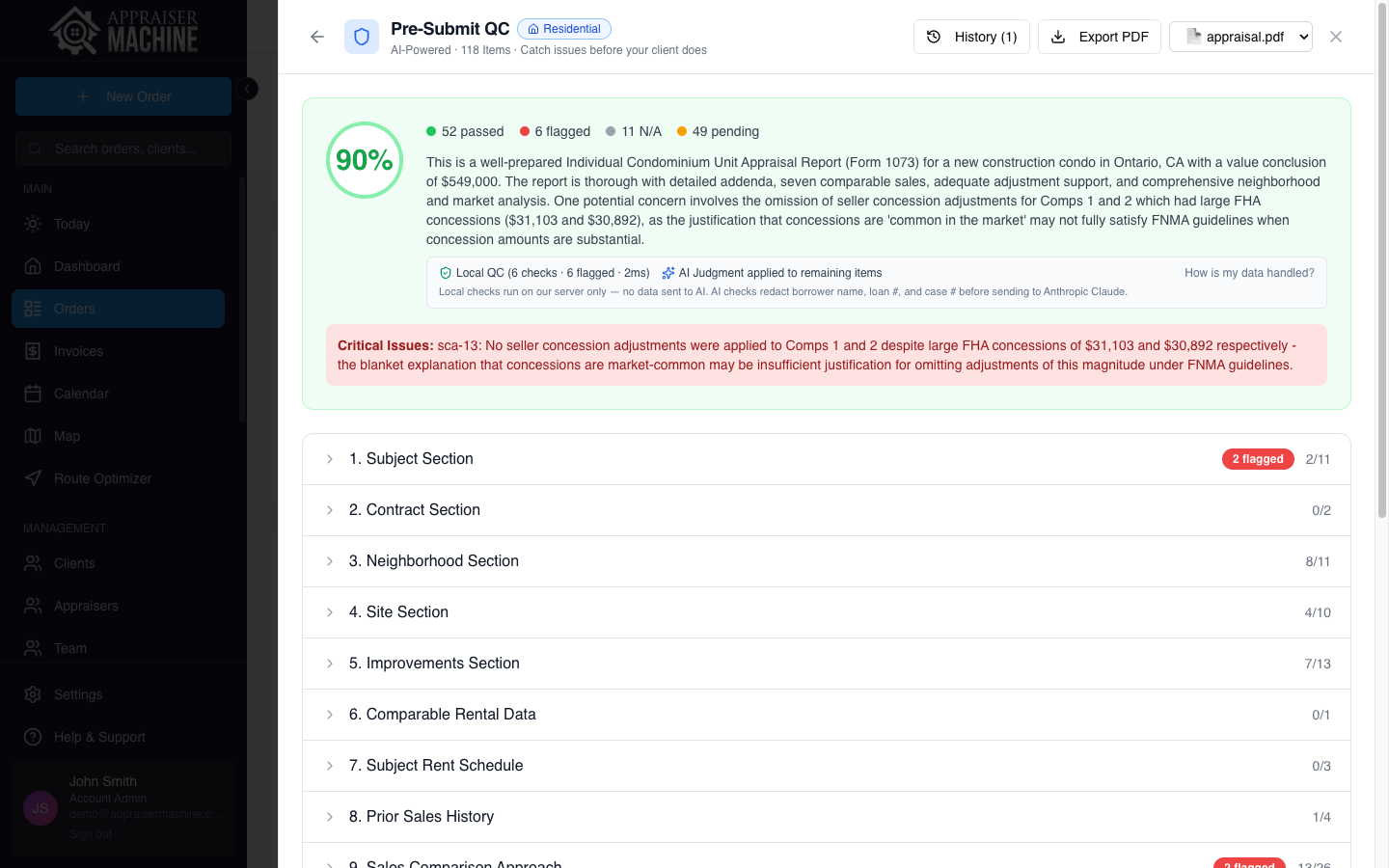
Pre-Submit QC results showing a 90% score with 52 passed and 6 flagged items. A trust strip indicates 'Local QC (6 checks • 6 flagged • 2ms)' and 'AI Judgment applied to remaining items', with a note that local checks run on-server with no data sent to AI while AI checks redact borrower name, loan number, and case number before sending to Anthropic Claude.
  • Source badges on every QC finding — “Local” / “AI” / “Local + AI” with hover tooltips explaining provenance
  • Per-company kill switch — flip AI judgment off for your whole company from Settings → Company. Deterministic Step 1 checks keep running either way.
  • One-click AI audit export — JSON or CSV per order with Anthropic DPA links inline, account-admin scoped
  • Borrower PII tokenized before any AI call — loan #, case #, SSN, email, phone all redacted before Step 2; rehydrated only on the response you see
  • Two-step architecture — Step 1 runs locally (no AI, no network); Step 2 is optional, always disclosed, and never the first pass
  • Per-user first-run disclosure — every teammate acknowledges AI use before their first Step 2 run
  • Public subprocessor list — /subprocessors shows every vendor we use, what data they touch, and where

Smart Workfile Engine

Your Workfile Builds Itself

Your workfile builds itself as you use the platform. Every AI narrative, photo analysis, property data fetch, and comp addition is silently logged. Document comp selection and rejection reasoning with quick-tags. Generate a structured workfile PDF in one click. Better documentation with less work.

  • Auto-capture from 6 AI tools — zero clicks required
  • Comp decision capture — tag selection and rejection reasoning
  • AI converts your tags into professional reasoning narratives
  • One-click structured workfile PDF (cover page, 7 sections, audit trail)
  • Timeline + By Section views on the full workfile page
  • Voice notes — dictate observations directly into your workfile
  • Workfile completeness checked during Pre-Submit QC
  • Complete workfile ZIP with all files, photos, and analysis

Homeowner Walkthrough Survey

Know What You're Walking Into

Send a link before the inspection. The homeowner fills out UAD-equivalent detail — materials, conditions, room dimensions, environmental hazards — and uploads photos from every angle. You arrive prepared with Anow-level data already collected.

  • Mobile-friendly survey — homeowners complete it on their phone
  • 6 sections with full UAD depth: exterior, foundation, interior, rooms, parking, extras
  • Detailed fields: window types, roof age, HVAC age, flooring, countertops, fixtures, and more
  • Photo uploads from homeowner — review before you drive out
  • AI photo tagging — one click classifies every photo by room, materials, and condition
  • AI-assisted C/Q rating suggestions from photos + responses — you confirm before they land in the report
  • Side-by-side view: homeowner data vs. AI professional analysis
  • Accept or decline AI suggestions per section — you stay in control
  • Your company logo and name on the survey — it looks like your form, not ours
  • SmartCopy — copy AI analysis straight into your report software or plain text
  • Download all photos as ZIP for your files

Instant Quote Forms

Stop Losing Private Clients to Your Voicemail

Prospects get an instant appraisal fee, enter their info, and pay to reserve — 24/7, without calling your office. Payment auto-creates a live order in your dashboard. Three modes: traditional form, AI Chat, or Hybrid. Included with every plan.

  • Instant pricing engine — base fees, complexity surcharges, travel tiers
  • Stripe checkout — prospects pay to reserve, money to your account
  • County-based service areas with auto-calculated travel surcharges
  • AI Chat widget — conversational quoting from YOUR fee schedule
  • Quick Start setup — live on your website in under 5 minutes
  • Auto order creation with invoice marked paid
  • Complexity screening and out-of-area routing
  • Embed on any website, share via direct link or email signature
  • Already have a form? Pipe submissions from your website, CRM, or Zapier straight into Orders or Quotes via webhook
  • Built-in analytics with source tracking

Mobile-Friendly Design

Your Office Is Your Truck

Works on phone, tablet, or computer. Same features, same data, wherever you are.

  • Responsive design on any screen size
  • Upload photos directly from phone camera
  • Update orders from the property
  • GPS coordinates for properties
  • Fast performance on cell data
  • Common tasks in 2-3 taps

Business Intelligence

Data-Driven Decisions

Analytics & AI Assistant

Understand Your Business

Ask AI — a natural-language business assistant that queries your own data. Reads orders, clients, invoices, fees in plain English. Borrower and contact PII is tokenized before any AI call. AI never sees the actual identifying values.

  • AI assistant with voice input and voice output
  • Ask questions in plain English - get real answers from your data
  • YTD vs last year comparisons — orders, revenue, delivered, with % change
  • Revenue and order breakdown by work type (Lender, Private, Commercial)
  • Pipeline value tracking — see total $ of in-progress work
  • Revenue trends and client analysis
  • Visual dashboards with charts and graphs
  • Month-over-month, year-over-year trends
  • Top client rankings by revenue

Integrations

Works With What You Use

Direct integrations with Stripe, QuickBooks, Next Level Pro, Google Calendar, Outlook, and more.

  • Stripe: Accept credit card payments
  • QuickBooks: Auto-sync invoices and payments
  • Next Level Pro: Bi-directional contact sync, automation triggers, and pipeline visibility
  • Google Calendar + Outlook: Two-way event sync
  • MISMO XML export for major report software
  • Import from Anow, Mercury Network, MISMO XML, and spreadsheets

Compatibility

Works With Your Tools

Appraiser Machine isn't a replacement for your report-writing software. It works alongside it - and everything else you use.

Report-Writing Software

We generate the content. You paste it into your report software. Smart Copy formats output specifically for your platform.

  • MISMO XML export for major report software
  • Smart Copy formatted for your platform

Business Integrations

Connect the tools you already use. Sync happens automatically - no manual export/import.

  • Stripe (payments)
  • QuickBooks Online (accounting)
  • Google Calendar + Outlook (scheduling)
  • Next Level Pro (CRM)

Import Your Data

Already using another platform? Bring your data with you. No starting from scratch.

  • Anow (native CSV import)
  • Mercury Network (MISMO XML)
  • MISMO XML from your report software
  • Any spreadsheet (CSV/Excel)
  • PDF order extraction (AI)
Switching from Anow?

For Commercial Appraisers

Commercial appraisal software that actually understands commercial.

Auto-detected 65-item commercial QC, AI contradiction detection across 80-page narratives, income approach and cap rate support, institutional-grade delivery. Built into the same platform as residential.

See the commercial page

Growth Tools

When You're Ready to Grow

Once your operations are running smoothly, these tools help you find better clients and grow your practice.

Prospecting & Lead Generation

Ready to Grow? Find Private Clients

Once your operations are running smoothly, use built-in tools to find estate attorneys, divorce lawyers, and private clients who pay 2x what AMCs do.

  • Google Places search by business type and location
  • Automatic contact enrichment (email, phone, decision-makers)
  • Interactive map of prospects in your service area
  • Export to spreadsheet or sync to a CRM for follow-up campaigns
  • Bulk operations for efficiency
  • Just 3-5 new private clients can add $20,000-40,000 annually

Feature Questions

See It In Action — Start Your Free Trial

Every feature included. Cancel anytime. No setup headaches.

21-day free trial · Cancel anytime · 30-day money-back guarantee

Appraiser Machine Logo
Modern appraisal management software built for appraisers who want to run an organized, professional practice.

support@appraisermachine.com

© 2026 AppraiserMachine.com, a division of J Squared LLC
Infrastructure providers are SOC 2 Type II certified·256-bit TLS encryption·USPAP 5+ year workfile retention·Aligned with USPAP AO-41 (March 2026)

APPRAISER MACHINE