
What Smart Pre-fill Means for Your Appraisal Workflow
Thirty-five fields. That's approximately how many property data fields UAD 3.6 requires you to populate for a standard residential report. Year built. GLA. Lot size. Room counts. Foundation type. Roof material. Exterior wall material. Heating type. Cooling type. And on and on.
Under the old forms, you'd type most of these from memory after your inspection, cross-referencing county records on the side. Under UAD 3.6, with room-level detail and structured data requirements, the data entry is more extensive and more specific. Getting all 35+ fields right, for every report, takes time and attention that should be going to analysis - not data entry.
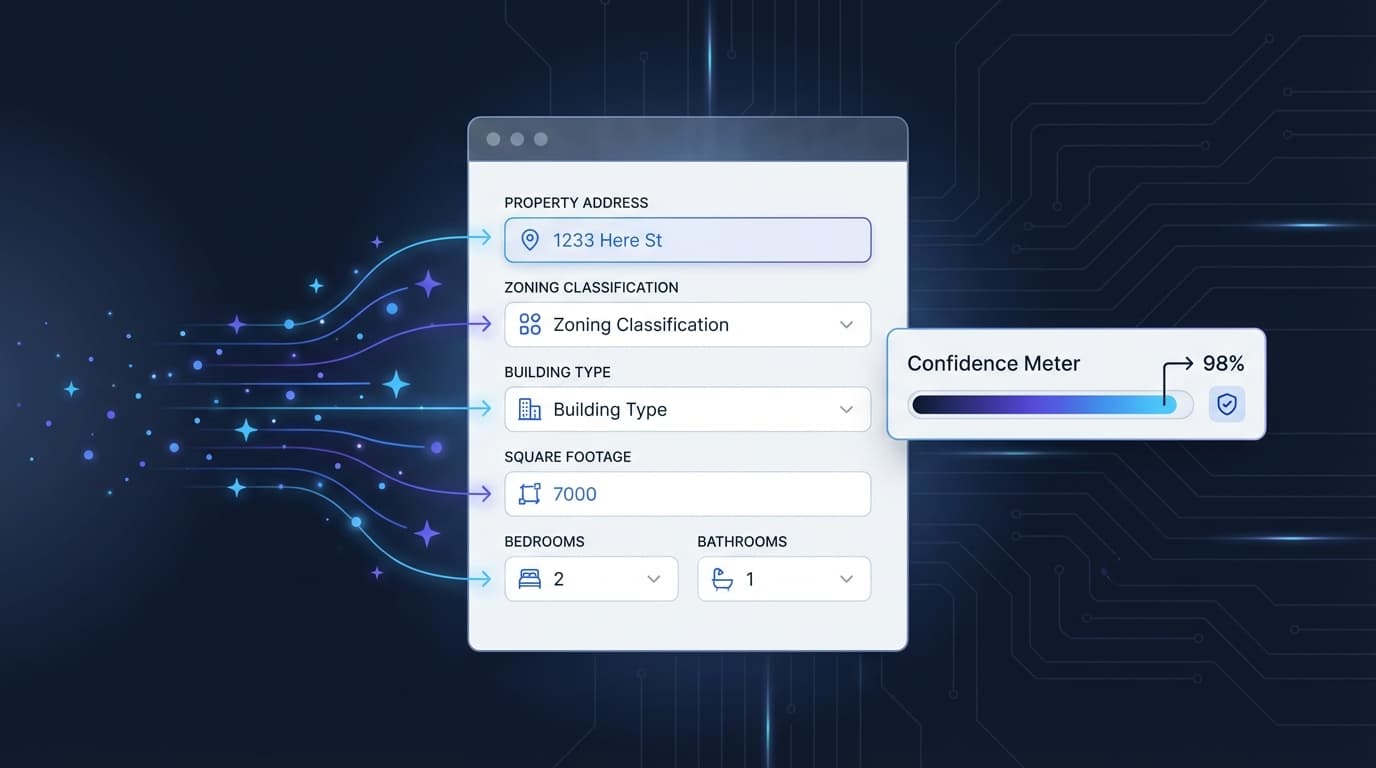
Smart Pre-fill changes the workflow: enter the address, and the system pulls available data from county assessor records. Year built, GLA, lot size, room counts, foundation, roof, exterior materials, and more - populated in one click. You verify each field against your inspection findings. Accept what's correct. Override what isn't. Move on to the analysis.
It's not a shortcut. It's a head start.
How It Works in Practice
You accept a new order. Enter the property address. Click "Pre-fill."
The system queries county assessor databases and returns what's available: year built (1987), GLA (1,842 sq ft), lot size (0.28 acres), 3 bedrooms, 2 bathrooms, slab foundation, composition shingle roof, brick veneer exterior. Each field has a source link (so you can see where the data came from) and a confidence indicator.
You go to the inspection. You measure. You observe. You document.
Back at your desk, you open the pre-filled data alongside your inspection notes. The GLA from the county says 1,842. Your measurement says 1,856. You override with your measurement - the county records reflect the original build, but you measured a 14-square-foot enclosed patio that was added since. The year built matches. The foundation matches. The roof was replaced since the county record (the homeowner told you it was done in 2021), so you update the roof condition and note the improvement.
Ten minutes of verification versus 30 minutes of manual entry. Same accuracy - better, actually, because you're comparing two data sources (county records + your inspection) instead of working from memory alone.
Why County Records Aren't Enough (And Why That's the Point)
I want to be direct about something: county assessor records are not always accurate. Remodels lag. Additions go unrecorded. Conversions from garage to living space don't always make it into the system. One data provider's own documentation notes that "because of occasional lag times in availability and/or processing of public record data, the data may not always reflect the most current information." (RealComp data accuracy guidance)
That's exactly why pre-fill is a starting point, not a final answer. The appraiser's inspection is what validates, corrects, and completes the data. Pre-fill gives you something to verify against. Your eyes on the property give you the truth.
This is where your professional expertise adds value that no database can replace. The county says 3 bedrooms. You see a room that's been converted from a bedroom to an office - it has no closet and the original bedroom door was removed. Is it still a bedroom? That's a judgment call that requires you at the property. Pre-fill gives you the county's answer. Your inspection gives you the correct one.
The UAD 3.6 Data Burden
Under the old 1004, you might fill in 15-20 property data fields. Under UAD 3.6, that number roughly doubles. Room-level detail adds dimensions, condition, and materials for each room individually. Energy efficiency fields add HVAC type, insulation, windows, and solar. Disaster mitigation adds storm shutters, roof strapping, and fire resistance.
Entering all of this manually for every report means more time at the keyboard and more opportunities for transcription errors. Forgetting a field means a revision request. Entering the wrong year built because you transposed digits means a compliance issue. The more fields, the more friction.
Pre-fill reduces both the time and the error rate by giving you a data foundation to build on. You're confirming and correcting, not creating from scratch. The attention you save on data entry goes to the analytical work that actually requires your expertise.
TOTAL Integration
For TOTAL users (the majority of the appraiser market), the workflow connects directly. Appraiser Machine's Smart Pre-fill generates a native .tdcx file - TOTAL's format - with the pre-filled data already mapped to the correct report fields. Import the file into TOTAL and the data populates directly. No copy-paste. No manual field-by-field entry.
For ACI and ClickFORMS users, the system exports MISMO XML. For SFREP users, Smart Copy formats the data for paste into SFREP fields.
The goal is to work with whatever report software you use, not replace it. Your report software produces the final document. Smart Pre-fill feeds it the data so you don't have to type it manually.
What Smart Pre-fill Doesn't Do
It doesn't fill in your analysis. Your comparable selection, adjustments, reconciliation, and value opinion are entirely yours. Pre-fill handles property characteristics - the factual data about the subject property. Everything analytical is your professional work.
It doesn't skip your inspection. The data comes from county records, not from a crystal ball. Your inspection is what makes the data accurate. Pre-fill gives you something to check against. It doesn't give you permission to skip the checking.
It doesn't guarantee accuracy. Some fields may be outdated, incorrect, or unavailable. The confidence indicators help you know where to focus your verification, but every field should be confirmed during your inspection process.
The Five-Minute Difference
Here's what the practical difference looks like on a Tuesday afternoon:
Without pre-fill: Accept order. Go to inspection. Come back to desk. Open county assessor website. Look up property. Write down year built, GLA, lot size. Open report software. Enter each field manually. Realize you forgot to check the foundation type on the assessor site. Go back. Find it. Enter it. Repeat for 30+ remaining fields. Total: 25-35 minutes of data entry before you start any analysis.
With pre-fill: Accept order. Click pre-fill. Glance at the populated fields. Go to inspection. Come back to desk. Compare pre-filled data against inspection notes. Override 3-4 fields where your inspection found something different. Accept the rest. Total: 8-12 minutes of verification. Same data quality. Less than half the time.
Multiply that difference across 15 reports per month and the time savings are substantial. Not dramatic per report - but compounding across a month and a year, it's one of those operational improvements that quietly reclaims hours without you noticing until you check the math.
For the complete AI tool ecosystem - narratives, photos, property data, and voice - see AI for Appraisers: What It Actually Does.
Related Articles:

Jon Barrett
Jon Barrett is the founder of Appraiser Machine and has spent over a decade working with independent appraisers. He's built 300+ appraiser websites, co-led a national appraiser mastermind group, and talked with hundreds of appraisers about what's actually working in their practices. He built Appraiser Machine because the operations side of running an appraisal practice was still stuck in spreadsheets and duct tape - and appraisers deserved better.