
The Appraisal Tool Iceberg: The Part You Build and the Part You Maintain
It's Monday. You've got four inspections on the calendar and a report due by noon. You open the script that pulls tonight's orders into your spreadsheet, and it's broken. Something updated over the weekend. Now you're debugging before your first coffee instead of driving to your first inspection.
You'll fix it. You always do. That's not the problem.
The problem is that this is the third time this month.
You Built Something That Works
I want to say this first, because I mean it. If you've built your own tools for your practice, you did something most appraisers never will.
Maybe it's a comp puller. A neighborhood analysis that runs in seconds. A quoting form. An AI assistant that drafts the boring parts. A tracker that finally shows you where every order stands. You described what you wanted, it started working, and a piece of your process that used to live in your head now lives in software you made.
I've built software for appraisers for years, and that moment never gets old. I talk to more and more appraisers who are doing exactly this. And I hear some version of the same thing from almost all of them:
"It works. But it takes work to make it work."
They're in three workspaces, keeping three systems in sync. They split their week between appraising and keeping their tools alive. They're proud of what they built, and they should be. They're also tired.
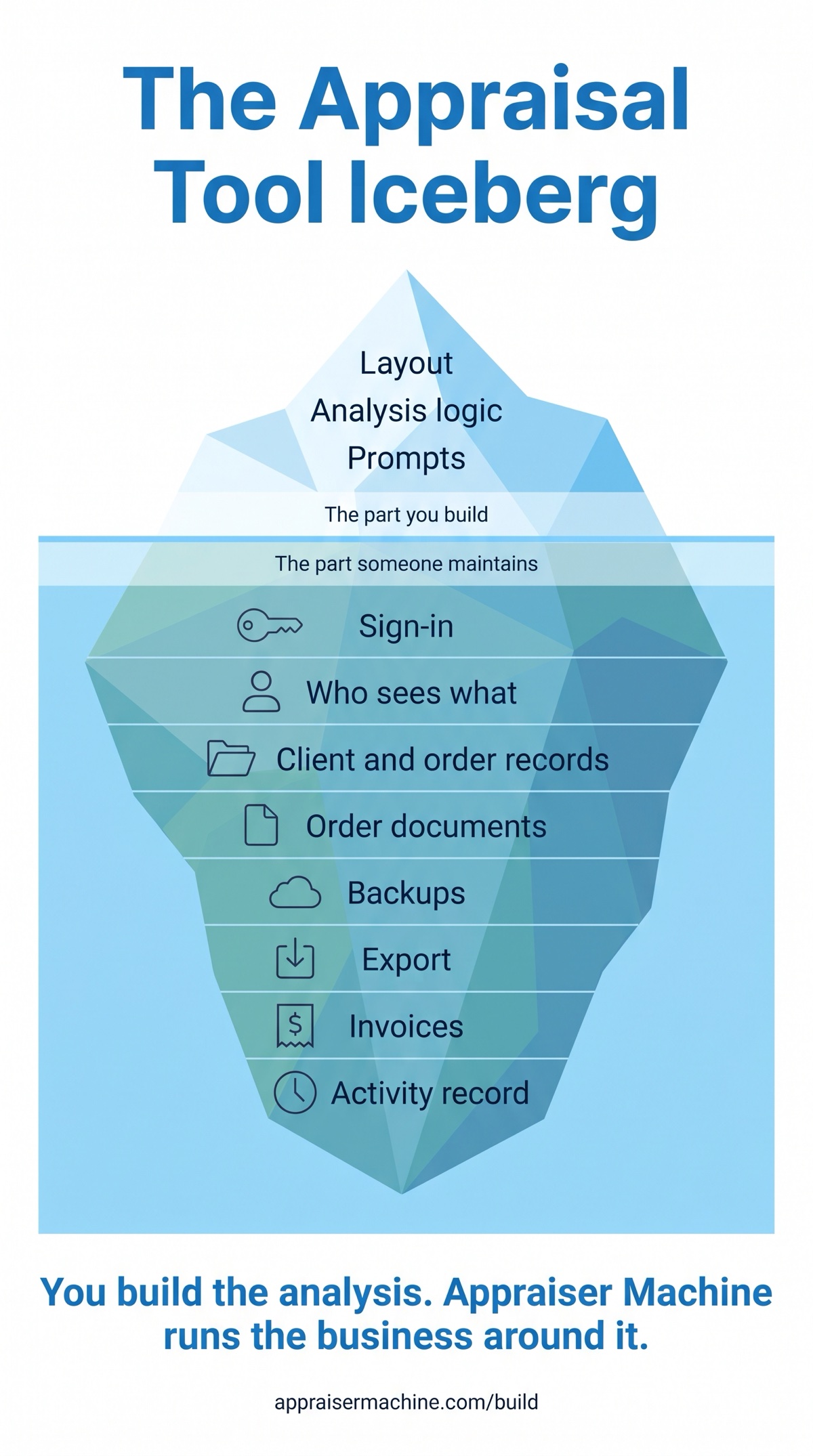
That's the iceberg.
The Part You See
Above the water is the part you enjoy. The layout. The analysis logic. The prompts you've tuned until the output sounds like you.
That's craft. It's where your experience as an appraiser shows up in software, and it's worth every hour you put into it.
The Part You Don't See Until It Breaks
Below the water is everything that has to keep working once a tool holds client and order data. Who can sign in. Who can see what. Where the files live. Whether there's a backup. Who got paid.
None of it is exciting. All of it bites eventually. Here's when.
When someone leaves
Your VA moves on. Or a trainee. They still know the spreadsheet link. They might still have the password to the shared login.
In Appraiser Machine, every person signs in with their own account, and they can turn on an authenticator app for a second step. When someone leaves, an account admin deactivates them. They can't sign in anymore, and the change is logged. You decide, area by area, who sees what: each area is No Access or Full Access, and areas like orders, clients and invoices also offer View Only.
When a computer dies
The laptop with the spreadsheet won't boot. Or the folder of engagement letters and photos was on the desktop, not in the cloud.
In Appraiser Machine, each order's files live in that order's workfile, not on your laptop. Your records are backed up automatically every day. That's on by default, and an account admin can restore from a previous backup.
When a client asks about a file from two years ago
An attorney calls. They need to know when you inspected, when you delivered, and whether the fee changed. Now you're searching three places and your email.
In Appraiser Machine, every client has one record with tabs for their orders, messages, expenses, notes and tags. Every order has an activity feed that records status changes, appraiser assignments, notes, uploads, fee changes and due date changes as they happen. You don't rebuild the history from memory. It's already there.
When you want the numbers
It's tax time, or you just want to know who still owes you.
In Appraiser Machine, invoices have line items and are tied to the order, with statuses like sent, viewed, partial, paid and overdue. And if you ever want your data somewhere else, an account admin can export orders, clients, invoices, payments, quotes, calendar events, mileage logs and more as CSV files, or a full backup as JSON. It's your data. You can always take it with you.
The Math on Upkeep
Here's a hypothetical. Say keeping your tools running takes four hours a month. A fix here, a broken login there, a backup you meant to check.
That's 48 hours a year. More than a full work week, spent on the part of the iceberg nobody sees and no client pays for.
Now say you spent those 48 hours on the analysis tool you actually care about. Or on inspections. Or on getting home before dark.
You Didn't Waste That Time
If you're reading this and thinking "so everything I built was pointless," it wasn't.
You proved the concept. You know exactly what your practice needs, because you built it. Every tool you made is a spec sheet for how you work.
So sort it. Put each tool you built into one of two piles.
Business tools. Order lists, client lists, calendars, invoice trackers. If you built one of these, you built it because you needed it. That instinct was right. Appraiser Machine already has them, and they share one set of records. The work you put into yours told you what matters. Now let it live somewhere that someone else keeps running.
Analysis tools. Market analysis, comp selection, adjustment support. These are yours. Keep building them.
And they don't have to live on an island. Your analysis tool can read your orders and schedule from Appraiser Machine, get a signed notice when someone changes an order's status on the order, and leave a note on the file. Your account admin sets up that connection and can turn it off at any time. That means your tool starts from the order that already exists, with its address, due date and client name, instead of asking you to type them again.
The Build page lays out exactly what a connected tool can read, the one thing it can write, and the events it can listen for.
Keep building the tools you love. Let Appraiser Machine hold the record they sit on.
Common Questions
"Was building my own appraisal tools a waste of time?" No. You proved the concept. You know exactly what your practice needs because you built it. The analysis tools, the ones that reflect how you appraise, are worth keeping and improving. What usually isn't worth your time is maintaining the business record underneath them: sign-in, access, client and order records, files, backups, invoices and order history.
"Can I keep my own analysis tools if I use Appraiser Machine?" Yes. Keep building the tools you use for market analysis, comps and adjustments. Appraiser Machine holds the orders, clients, schedule and invoices they sit on. Your tool can read your orders and schedule, get a signed notice when someone changes an order's status on the order, and leave a note on the file. Your account admin sets up that connection and can turn it off at any time.
Related Articles:

Jon Barrett
Jon Barrett is the founder of Appraiser Machine and has spent over a decade working with independent appraisers. He's built 300+ appraiser websites, co-led a national appraiser mastermind group, and talked with hundreds of appraisers about what's actually working in their practices. He built Appraiser Machine because the operations side of running an appraisal practice was still stuck in spreadsheets and duct tape - and appraisers deserved better.