
Every private order, you open last month's estate letter, hit Save-As, and start the careful read. Change the party. Swap the effective date to the date of death, then go hunting for the retrospective-value paragraph in a letter you wrote two months ago. Engagement Letter Studio turns the order you already filled out into a complete draft engagement letter in your own clause wording.
Full access. Cancel anytime.
A probate attorney sends you an estate assignment. Before you can touch the work, you open last month's estate letter and start the careful read. Change the party. Change the property. Change the fee. Change the effective date to the date of death, then remember you also have to swap in the retrospective-value paragraph and its extraordinary-assumption note, which live in a different letter you did two months ago that you now have to go find.
Every assignment, on the part of the job that is not the appraisal.
And the whole time, a small voice is asking: did I catch everything?
Leave the litigation-and-testimony clause off an estate job, and the day that estate lands in a will contest, you are sitting for a deposition you never agreed to bill for.
Define the intended use wrong, and you have written a document that works against you.
Forget to define the standard of value on a divorce assignment, and you have handed opposing counsel a thread to pull.
The lender tools were never built for this. They assume the letter arrives with the order. So the best-paying work you do is the work your software does the least for. You should not be a part-time paralegal doing find-and-replace in Word at 9pm.
You already typed the property, the party, the fee, and the dates into the order. The Studio reads that order and assembles the draft from it. Nothing here is hand-waved.
Estate, divorce, trust, litigation support, pre-listing, or tax appeal. Any report type works, including a 1004 done as private work. The purpose is what decides which clauses get pulled.
Open the Engagement Letter card and click Draft Engagement Letter. Client name and email, fee structure and amount, and the dates all prefill from the order. Four fee structures are supported: flat, hourly, retainer only, and retainer plus hourly. You are confirming, not retyping.
Before anything generates, you confirm the standard of value, the effective date, and the intended use. These are never pre-checked, and the letter will not generate without them. The Studio proposes; you decide. That is the line, and it stays there on every letter.
The full letter assembles from your clause library, your approved wording reproduced exactly, with this order's facts merged into the blanks. Set a past effective date and label it a date of death, and the retrospective-value language and its extraordinary-assumption note come in on their own. No model paraphrases your terms. What you approved is what prints.
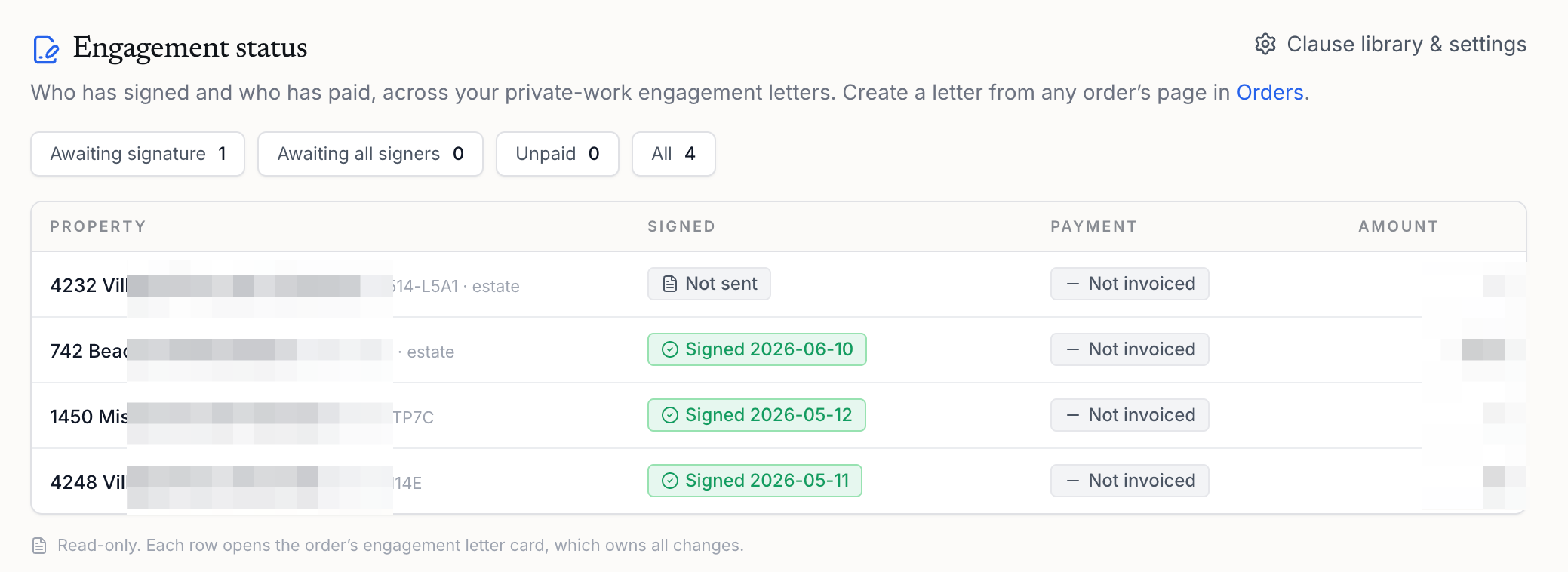
Download to Word or PDF with a DRAFT watermark in the header until the letter is signed, and the in-app preview matches the export exactly. Send it through whatever channel you already use. When the signed letter comes back, click Mark Signed and the Engagement board reflects it, so signature and payment status sit in one place instead of in your head.
Upload one of your past engagement letters under Settings, and the Studio turns your wording into a reusable clause library. Your one-off facts become merge fields like party name, fee, and effective date, and you review every clause before it is ever used: your original text side by side with the reusable version. From then on, your clauses take priority over the built-in starter set.
Estate, divorce, trust, attorney, and tax appeal work is where customary fees actually live, and it is the work where the engagement letter is your job, not a lender's. This is the one feature that treats that as the main event.
On estate, divorce, trust, and tax appeal letters, the litigation-and-testimony billing clause is included automatically, because those are the assignments that tend to end up in court later. Removing it is one click for the jobs where it does not fit, like a simple pre-listing, and the removal is logged. You are not relying on memory anymore.
No past letters to upload? Every account starts with a neutral clause set covering scope of work, intended use and users, definition of value, effective date, all four fee structures, delivery, litigation and testimony billing, prior services, confidentiality, limiting conditions, and authorization. It produces a complete draft on its own.
Pick retainer only or retainer plus hourly, mark the retainer paid when funds arrive, and a retainer ledger tracks your hourly time against the balance. Consulting and litigation-support work stops living in a separate spreadsheet.
No. Clause selection follows rules based on the assignment, and your approved clause wording is reproduced exactly with this order's facts merged in. AI is used in exactly one place: when you upload a past letter, to find where one clause ends and the next begins. Everything it finds waits for your review before it is ever used. The legal wording stays what you approved, full stop.
No. The draft is a starting point for your review, not legal advice. Your firm reviews every letter before it goes out. The first time anyone on your account generates a letter, an admin confirms one acknowledgment: the Studio assembles drafts, and you review them.
No, and this is on purpose. There is no built-in e-signature and no DocuSign integration. You collect the signature in whatever channel you already use, then record it here so the Engagement board reflects reality. You keep your signing process. The Studio handles the drafting and the tracking around it.
No. Your letters assemble by rules, not by a model reading your clients' details. The one place AI touches anything is finding clause boundaries in a letter you upload, and that runs only with your go-ahead. Your data stays yours.
Upload it. The Upload Engagement Letter button works on any order, including lender and AMC orders. Choose how to track it (still needs signing, no signature needed, or already signed), and it lands on the Engagement board and in the order's workfile, tracked exactly like a letter you drafted here.
The limits are the point. A tool that is clear about where the machine stops and your judgment starts is a tool you can actually put your license behind.
It lands in your inbox. You open the order you already filled out, confirm the standard of value, the effective date, and the intended use, and the draft is done, in your wording, with the date-of-death clause and the litigation-and-testimony language already where they belong. You confirm the details instead of starting from a Save-As. Then you go do the actual appraisal, with the part that used to eat your evening already handled.
21-day free trial. Cancel anytime. Your data stays yours.
support@appraisermachine.com
APPRAISER MACHINE